
For course creators & cohort instructors
Proof of work, on video.
No install for your students.
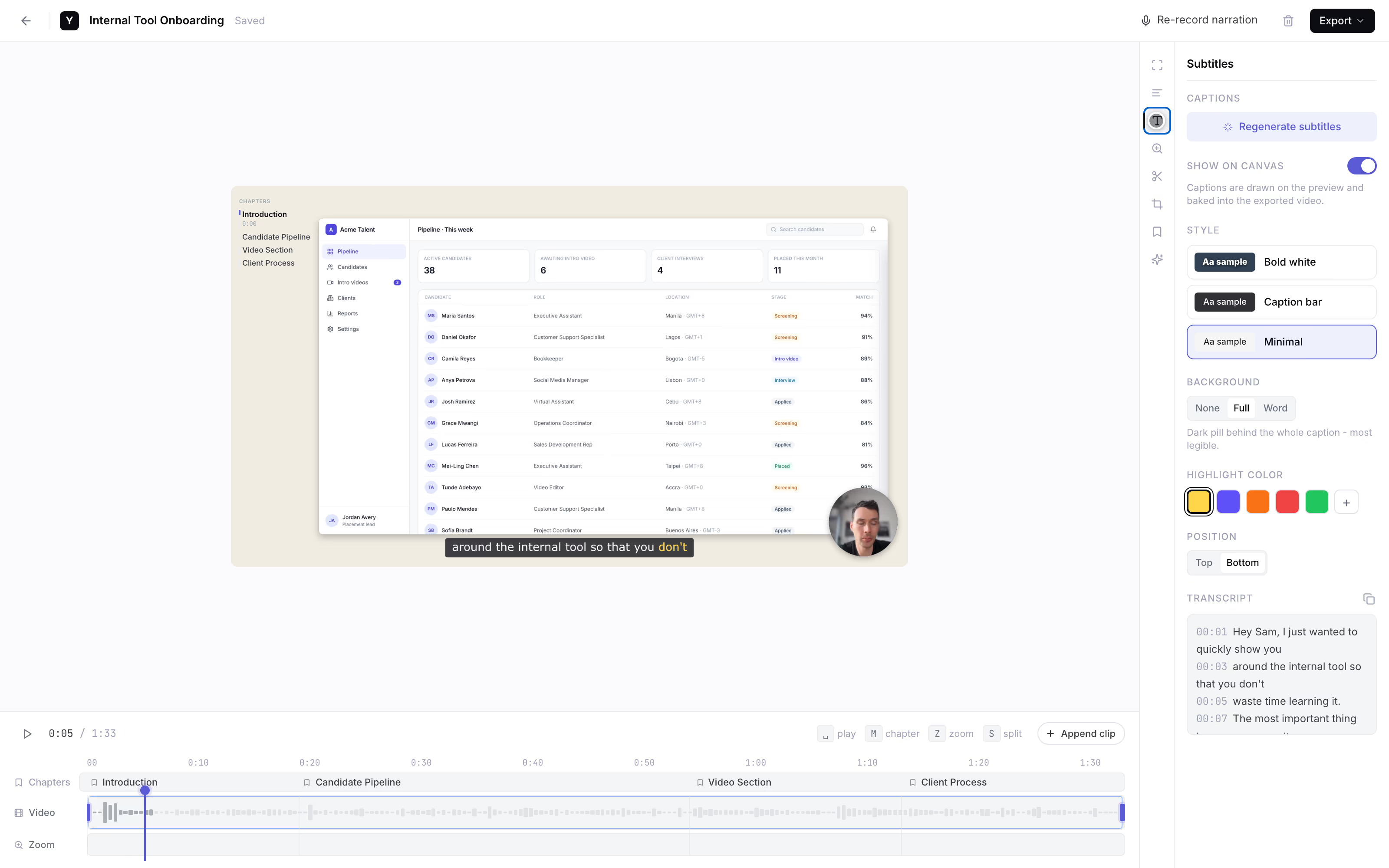
Screenshots don't show the process, uploads break, and half your cohort opens a support ticket instead of submitting. Send one link: the student records the exercise on their screen and talks through it, and you watch it back with subtitles.
Want submission links set up for your cohort? Reply to the email that brought you here.
How it works
One link per exercise.
The setup lands on us, not on the student you're asking to submit.
Send one link
Drop it into your cohort thread with a one-line ask. That's your whole part.
They record the exercise
The student opens the link and hits record, right in the browser. Nothing to install, no account to make.
You watch the submission
It lands back with you as a link with subtitles, so you skim what they said while working. Founder-run during the pilot.
AI subtitles
One link per exercise, and every learner can actually submit.
Why in-browser matters
See them do it, not just describe it.
- Students won't fight a recording tool. For one assignment, nobody installs software or makes an account. A link is the lowest-friction thing you can ask a learner to click - so submissions come in instead of turning into support tickets.
- The screen shows the process. A screenshot shows the answer; a screen recording shows how they got there and where they got stuck. That's what you need to give real feedback in a technical course.
- Subtitles let you skim a cohort. Read what a student narrated in seconds instead of sitting through every clip. Subtitles are the only AI feature we ship - and they're what makes feedback scale past 1:1 calls.
- One clip, one exercise. The 10-minute cap on the free tier bounds each submission to a single assignment, so you're reviewing focused clips, not hour-long screen dumps.
The honest comparison
Made for indie creators, not institutions.
A category-level look as of mid-2026; verify each vendor. We're the right call when you're teaching at creator scale, not running a school.
Link the student records in
YoRecord- Good for
- Any learner on a computer, no install and no account to submit proof-of-work.
- Where it breaks
- Desktop browsers only - no Safari, no phones. No LMS or gradebook integration.
Screencastify education links
- Good for
- Schools and institutions that buy at the district level.
- Where it breaks
- Priced for institutions, and the student needs the Chrome extension and an account.
Loom for Education
- Good for
- Teams already standardized on Loom with seats to give out.
- Where it breaks
- Seat- or team-based, and the student needs Loom set up on their end first.
LMS-native recorders (Canvas, etc.)
- Good for
- Institutions running a full learning-management system.
- Where it breaks
- Built for schools - irrelevant to an indie creator teaching on Skool, Circle, or Maven.
Privacy is built in: everything is processed client-side, and nothing leaves the device until the student shares it.
Work with the founder
Founding pilotNo self-serve dashboard yet. For the first creators, that's the feature.
Founding-creator price. Cancel anytime.
- The founder personally sets up your submission flow.
- Your prompt wording, shaped around how you run your cohort.
- Every student recording lands back with you - as a link with subtitles.
- Cancel anytime. The recorder stays free for every student you send a link to.
Reply to the email that brought you here.
We'll set up your submission flow together.
No forms · No payment button · A real person replies
Separate from YoRecord Pro ($4/month), which upgrades the recorder for individuals. The pilot is a done-for-you student-submission service - recording stays free for your students either way.
Straight answers
The honest bits.
Do my students need to install anything or create an account?
No - that is the whole point. The student opens yorecord.com/recorder in Chrome, Edge, or Firefox on a desktop or laptop, hits record, and walks through the exercise. No extension, no download, no account, no email required from them. That is the difference between a submission that actually arrives and a support ticket that says 'the recording tool won't let me sign up.' Desktop browsers only: no Safari, no phones.
Does it plug into my LMS or gradebook (Teachable, Kajabi, Canvas)?
No, and it is honest to say so. There is no Teachable, Kajabi, or Canvas integration - submissions do not appear as rows in your dashboard. What you get back is a plain share link, or an MP4. Paste it into your cohort thread, your Skool or Circle post, a spreadsheet, or wherever you already track students. During the pilot the founder makes sure every recording lands back with you as a link - that is the concierge, not a connector.
What if my students are on phones or tablets?
They can't record on a phone or tablet - YoRecord is desktop browsers only. That makes this a fit for courses where the exercise is done on a computer: Excel or spreadsheets, SQL, a no-code tool, marketing-ops, QuickBooks, CAD, a niche SaaS. If a chunk of your cohort learns on mobile, this won't reach them, and we would rather say that up front than have you find out mid-cohort.
How long can a student submission be?
Up to 10 minutes per recording on the free tier - which is plenty. The cap is a helpful constraint: it bounds one exercise to one clip. Tell students to record just the assignment - start recording, do the task while saying what they are trying and where they are stuck, stop. One assignment per clip.
Can I skim submissions quickly - are there subtitles?
Yes. AI subtitles are generated on the recording, so you can read what a student said while they clicked instead of scrubbing through the audio of every clip. That is the only AI feature we ship. It also helps accessibility for students who need captions. For a cohort of 20 to 50, being able to skim is what makes real feedback scale past live office hours.
What does the founder set up during the pilot, and what does it cost?
The recorder is free for your students forever - free to record, narrate, add subtitles, and share back a link, with a 10-minute cap per recording. The founder-run pilot, where we set up your submission flow so every recording lands back with you, is $9/month for founding creators. The list price is $19/month. There is no self-serve product yet: the founder personally shapes your prompt wording, gives you the link to send your cohort, and makes sure the submissions come back to you.
Prefer to try it first? Record a test clip in the recorder to see exactly what your students get.
Stop chasing submissions
Next exercise, get it on video.
One link. Every learner can submit.