
A free screen recorder
in your browser.
No signup, no download.
Record your screen and webcam, add AI subtitles, trim out the boring parts, export an MP4. One tab, start to finish.
Free, with no watermark · Your video stays on your device · Works on Chromebooks
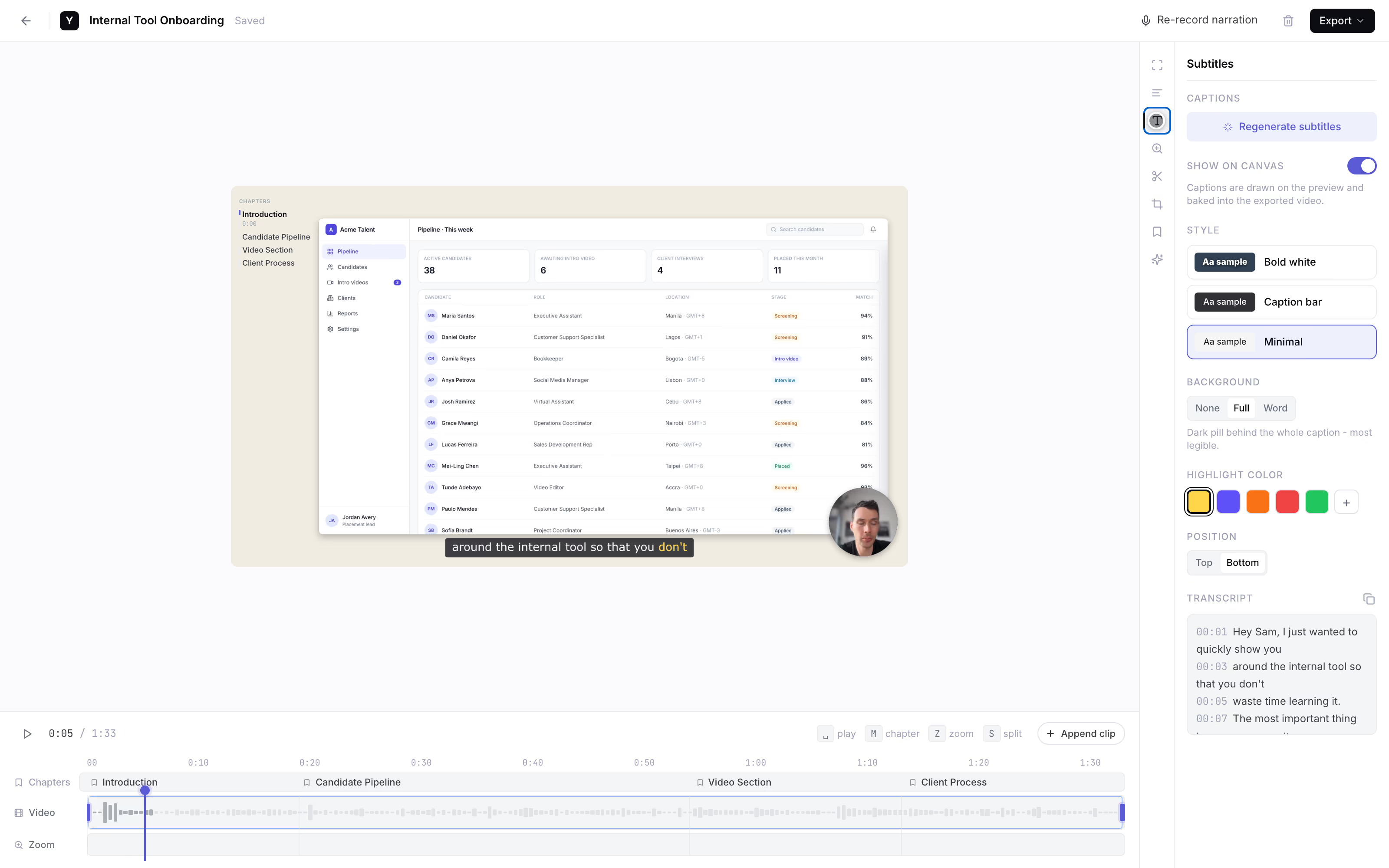
The real editor, not a screenshot. Press play, scrub, drag the camera, edit a caption.The YoRecord editor, recorded with YoRecord.
The setup
There is no setup.
Everything between you and the record button:
How it works
Record. Edit. Share. The end.
Three steps. What you see below is the actual product, not mockups.
Press record
Pick a tab, window, or screen. If you want your face in the corner, add the camera as a floating bubble. Elapsed time so far: about three seconds.
Make it watchable
Trim the dead air, speed up the slow parts, cut it into chapters. AI subtitles take one click, and you can fix them word by word.
Export an MP4 or share a link
Download the MP4, or make a share link if you want one. Either way, the recording stays in your local library, ready for second thoughts.
Private by architecture
Your video never leaves your device.
Unless you choose to share it.
There is no upload step. Recording, editing, and rendering happen right here, on your hardware. Generating subtitles sends out the audio for transcription, and only the audio. Creating a share link uploads that one video, because you asked it to.
Who it's for
Made for “can you send a quick video?”
Bug reports and quick answers
Record the tab, talk over it, paste the link in the ticket. Faster than typing, harder to misread.
Tutorials people watch on mute
Captions burn into the export, so your how-to survives the mute button.
Chromebooks and locked-down laptops
If it runs Chrome, it records. School and IT-managed laptops included. Screen recorder for Chromebook
Candidate intro videos
Hiring or staffing? Send one link. Candidates record an intro in the browser, and the video comes straight back.
Shopping around? We keep an honest comparison of 8 screen recorders, including the places where Loom and Screen Studio beat us. Coming from Loom specifically? Here's the free Loom alternative for switchers. Running an AI coding agent? It can share videos too - YoRecord for agents.
Questions
Answered plainly.
Is YoRecord really free?
Yes. Recording, editing, subtitles, and export are free, with no watermark. The catch we promised: each recording runs up to 10 minutes, and free exports are 720p. That's all of it.
What are the limits on the free plan?
Each recording runs up to 10 minutes, and you can make as many as you like. Free exports are 720p MP4 with no watermark. It records in Chrome, Edge and Firefox on a desktop computer, not in Safari or on phones. Pro lifts the cap to 20 minutes, exports sharper video and adds your own logo.
Do I need an account?
No. There is nothing to sign up for. Recordings save to a local library in your browser, so there is also nothing to log into.
Where do my videos go?
Nowhere, by default. Videos are recorded, edited, and rendered on your device. Two exceptions, both yours to trigger: a share link uploads that video, and AI subtitles send out the audio. Just the audio.
Does it work on a Chromebook?
Yes. It runs in the browser, so a Chromebook is enough. Desktop Chrome, Edge and Firefox work too.
Can I record my webcam too?
Yes. Record your screen and webcam together, with the camera as a draggable bubble, or record the webcam on its own.
Can I get Pro free?
Yes, for 3 months. Post about YoRecord on X, LinkedIn, Bluesky, Threads or Reddit, paste the link to your post on the pricing page, and the checkout opens. This is for the monthly plan: Add a card, pay $0 today, then $4/month after 3 months. Cancel before then and you pay nothing. If you stay a year, the $29 annual plan is still the lowest price; this offer is for the monthly plan.
Ready when you are.
One click. Your first recording is a minute away.
Free · No watermark · That was the whole pitch