For freelance web designers & studios
See what looks off.
No widget for your client.
“The header looks weird” costs you a whole revision round guessing at their screen. Send one link instead: the client records their screen walking through exactly what looks off, and you see the real state.
Want revision links set up for your projects? Reply to the email that brought you here.
How it works
One link collapses the whole thread.
The setup lands on us, not on the client you're asking to walk you through it.
Send one link
Drop it into your reply with a one-line ask, instead of another round of guessing. That's your whole part.
They walk through it
The client opens the link and hits record, right in the browser. No widget, no account to make.
You watch the walkthrough
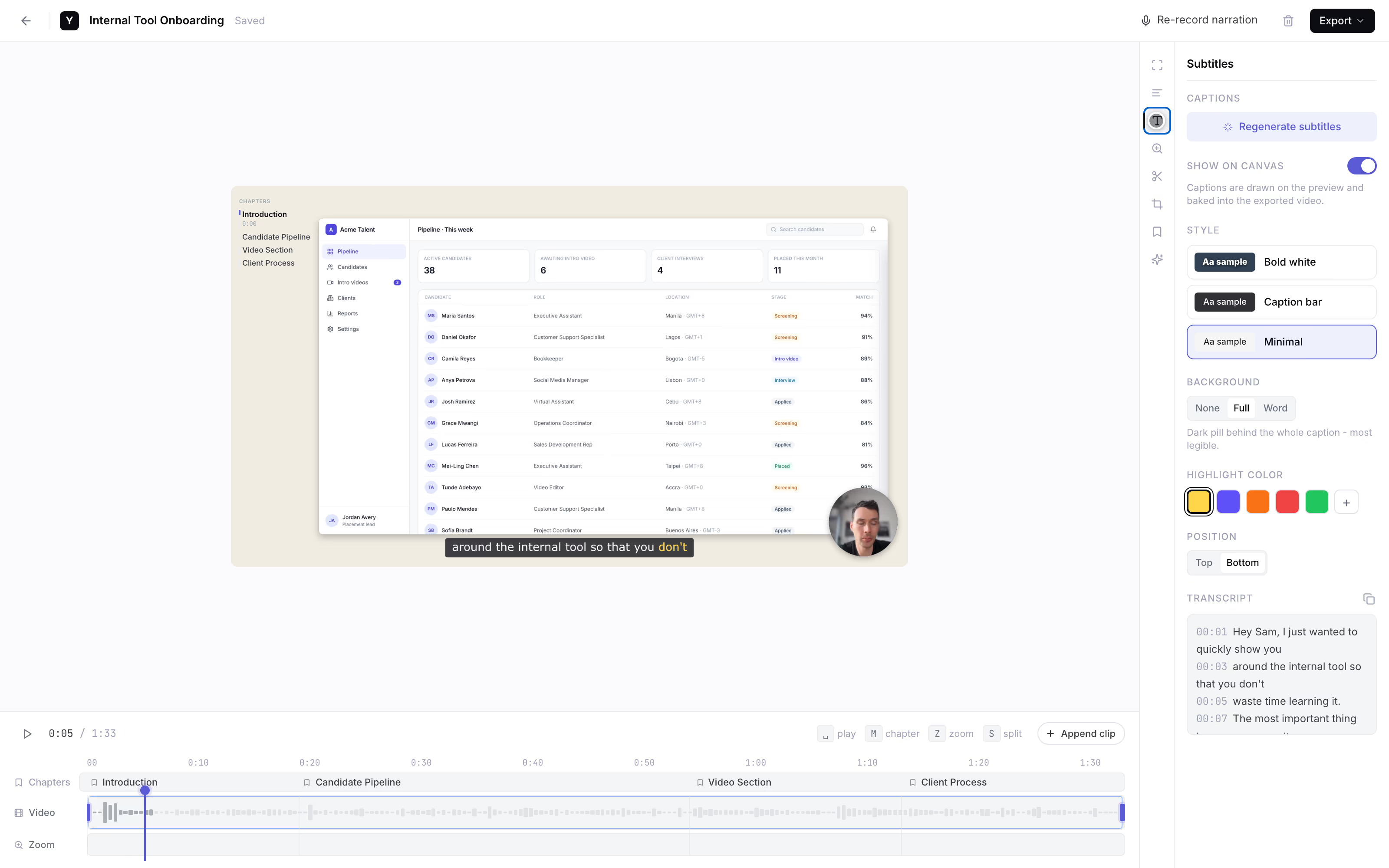
It lands back with you as a link with subtitles, so you read what they said while pointing at the screen. Founder-run during the pilot.
AI subtitles · auto
one link, and the vague email becomes a two-minute walkthrough.
Why a link beats a widget
See the real state, not a one-line email.
- Clients won't learn a feedback widget. The tools that pin and annotate all make the client engage an overlay or make an account. For a one-off note they just won't, so you get nothing usable. A link is the lowest-friction thing you can ask them to click.
- You see their browser, not yours. The whole point is what the client sees at their window size with their content. A screen walkthrough shows the header overlapping on their laptop - the thing you can't reproduce on yours.
- Their voice over the screen is the artifact. "This bit here, on my laptop, overlaps" spoken over the live page beats any typed note. Subtitles catch every word - the only AI feature we ship.
- Fewer rounds protects your fixed fee. One clear walkthrough collapses the ping-pong that drives scope creep. You fix the real issue in one pass instead of guessing across three emails.
The honest comparison
It depends who has to engage.
A category-level look as of mid-2026 - pricing moves, so verify each vendor. Visual-feedback tools have gotten pricier and dropped free tiers, which is why designers are looking for something the client will actually complete.
Link the client records in
YoRecord- Good for
- A non-technical client who will actually record a walkthrough with nothing to install.
- Where it breaks
- Desktop browsers only, and no pin-to-element markers - no Safari, no mobile shots.
MarkUp.io
- Good for
- Pin-and-annotate feedback when the client will engage the overlay.
- Where it breaks
- Removed its free tier and moved into the ~$79/mo range per mid-2026 comparison coverage - steep for a freelancer.
BugHerd
- Good for
- A pinned bug board with a widget on the live site.
- Where it breaks
- Starts around $39/mo for a small seat pack as of mid-2026, and the client has to interact with an on-site overlay.
Loom, the DIY fallback
- Good for
- A quick screen clip if the client already has it.
- Where it breaks
- The client has to have it or install it first - which is exactly the step a client skips.
We concede the annotation feature outright: no pins, no click-to-comment. We win only where those tools lose - the client will actually complete a link. Privacy is built in: everything is processed client-side, and nothing leaves the device until the client shares it.
Work with the founder
Founding pilotNo self-serve dashboard yet. For the first designers, that's the feature.
Founding price. Cancel anytime.
- The founder personally sets up your revision-request flow.
- Your prompt wording, shaped around how you run revision rounds.
- Every client walkthrough lands back with you - as a link with subtitles.
- Cancel anytime. The recorder stays free for every client you send a link to.
Reply to the email that brought you here.
We'll set up your revision-request flow together.
No forms · No payment button · A real person replies
Separate from YoRecord Pro ($4/month), which upgrades the recorder for individuals. The pilot is a done-for-you client-revision service - recording stays free for your clients either way.
Straight answers
The honest bits.
Does my client need to install a widget or create an account?
No - that is the whole reason this works. Your client opens yorecord.com/recorder in Chrome, Edge, or Firefox on a desktop or laptop, hits record, and walks through what looks off. No widget to learn, no overlay to click into, no account, no install. This is the one thing the client will actually finish. Desktop browsers only: no Safari, no phones.
Is this pin-to-element annotation like BugHerd or MarkUp?
No, and it is fair to say so plainly. We do not do pin-to-element markers, click-to-comment threads, or on-canvas annotation. If you want your client to drop pins on the live site, BugHerd, MarkUp, and Feedbucket do that. We win on a single axis those tools lose: a non-technical client will actually record a walkthrough from a link with nothing to install and nothing to sign up for. You hear their voice over their screen instead of decoding a one-line email.
Does it work for mobile-view issues or only desktop?
The client records on a desktop or laptop browser - Chrome, Edge, or Firefox. There is no Safari and no phone recording. So the honest fit is desktop and laptop review. If the complaint is specifically about how the site looks on their phone, this is not the tool for that shot. For everything they see on a laptop - a wonky header, a broken layout, text that overlaps at their window size - a screen walkthrough shows you the real state.
How long can a revision walkthrough be?
Up to 10 minutes per recording on the free tier, which is plenty for one page. A good revision walkthrough is 2-3 minutes: the client opens the page, points the cursor at what looks wrong, and says what they expected to see. One page or one round per clip keeps it easy to act on.
What does the founder set up during the pilot, and what does it cost?
The recorder is free for your clients forever - free to record, add subtitles, and share a link back. The founder-run pilot is $9/month for founding designers; the list price is $19/month. In the pilot the founder personally sets up your revision-request flow: the prompt wording you send, the link your client clicks, and the checks so every walkthrough lands back with you. There is no self-serve product yet - that hands-on setup is the pilot.
How does the recording get back to me - can I paste it into my project tool?
The client's recording is processed client-side, inside their own browser. Nothing uploads while they record. When they finish, they make a share link or download an MP4 and send it back to you. You get a plain link you can paste anywhere - your project tool, a Notion doc, a Slack thread, an email. There is no connector to configure and nothing to break.
Prefer to try before you ask? Run a test clip in the recorder to see exactly what your client gets.
Stop decoding
Next vague revision email, get it on video.
one link, and the round is clear.
Record a test clip yourself to see exactly what your client gets. When you want it set up for your projects, reply to the email that brought you here.