
For VA & staffing agencies
Screen candidates on video.
They just open a link.
"Send me a Loom" makes candidates install an app and make an account first, and half never do. Send one link instead: they record in the browser and it comes back to you.
Want it set up for your agency? Reply to the email that brought you here.
How it works, your side
One link out. One video back.
Three steps. Nothing for your team to learn, nothing for the candidate to set up.
You send one link
Pick one real screening question. The candidate gets the link and the prompt in your usual email or message.
They record in the browser
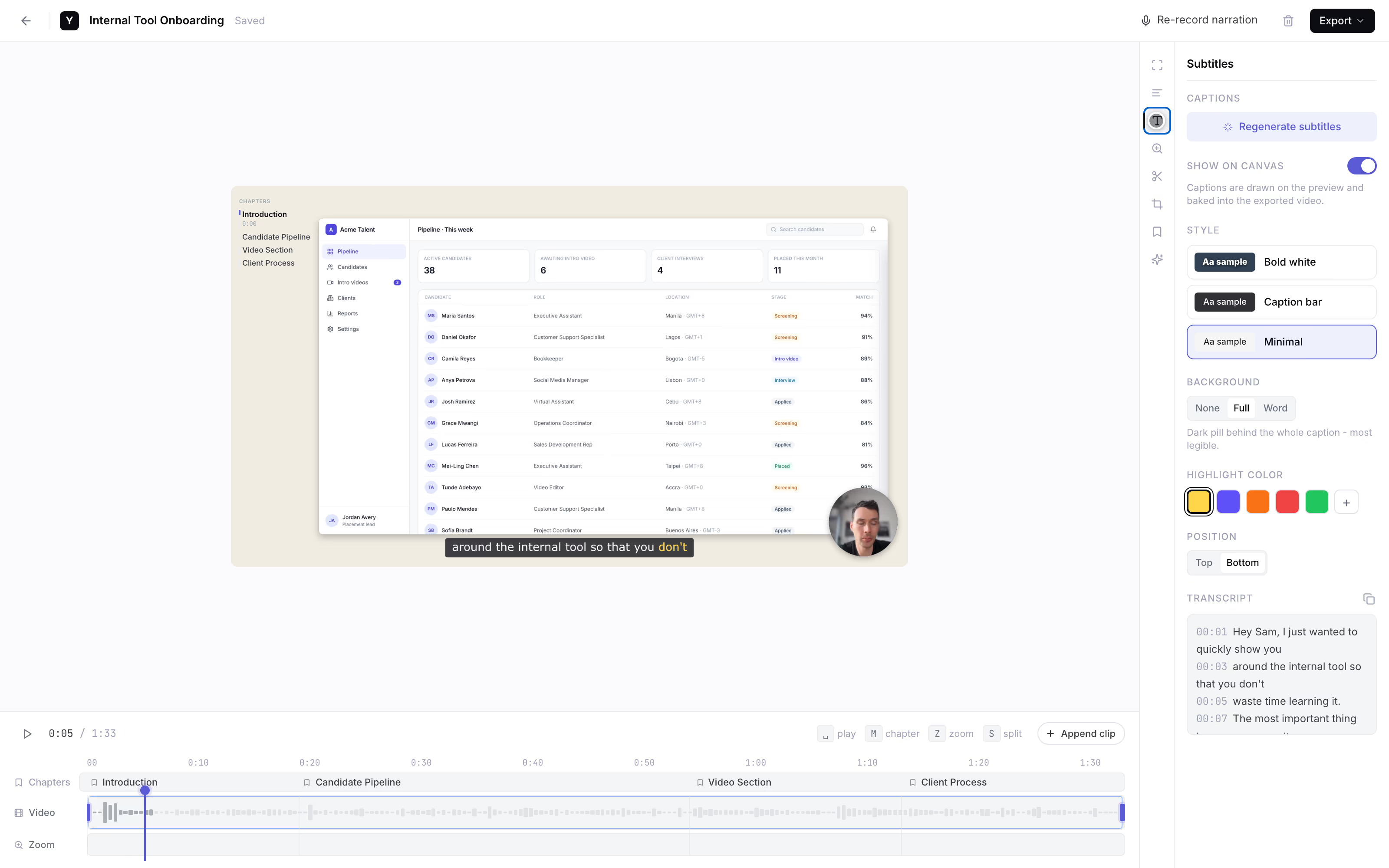
They open the link, allow camera and screen, and record. No download, no account. This is exactly what your candidate sees.
The video comes back to you
One clean video per candidate, not a Drive folder to chase. During the founding pilot the founder runs this by hand and makes sure every response arrives.
Screen + webcam
See the candidate and the work.
A talking-head intro tells you if someone is personable. The screen tells you if they can do the job - how they move through a spreadsheet, how they triage a messy inbox. One short recording shows both.
- Skills, not just talk. A screen walkthrough shows who can actually drive the tools they list on their resume.
- Skim, don't sit through. AI subtitles on every response, so you read the answer instead of scrubbing the audio.
- Built-in equipment check. Desktop-only means the recording confirms a real camera, mic, and browser all work.
The usual options
Where video screening breaks.
A rough view as of mid-2026. Free tiers move around; the friction pattern is what costs you candidates.
“Send me a Loom”
Needs an install or account before recording, and the free individual tier is capped. Every extra step is where a candidate on a locked-down machine drops out.
“Upload to Google Drive”
Huge files, slow uploads, and a permissions maze. Half the links come back as “request access,” so you police a folder instead of getting a clean video.
VideoAsk-style tools
Purpose-built for this, but free tiers are typically capped to a handful of responses a month and are webcam-first - weaker for a screen walkthrough.
Dadan
A browser recorder with a capped free tier and a webcam-first emphasis. Fine for quick clips; less suited to a screen-plus-face skills check.
Limits are approximate and change. Verify on each vendor's pricing page.
Founding pilot
Founder-runBuilt with early agencies. Shape it before it is a product.
Founding price. Cancel anytime.
- The founder personally sets up your prompt and link flow with you
- Your screening prompts, sent with each candidate link
- Every candidate video chased down and delivered back to you
- AI subtitles on each response, so you skim instead of sit through
- Cancel anytime - it is a pilot, not a contract
Reply to the email that brought you here.
A person sets up your first batch by hand. No forms, no dashboard to learn.
Not an ATS. It replaces the "send me a Loom" step, nothing more.
Separate from YoRecord Pro ($4/month), which upgrades the recorder for individuals. The pilot is a done-for-you screening service - recording stays free for your candidates either way.
Straight answers
The honest bits.
Do candidates need to install anything or sign up?
No. The candidate opens a link in Chrome, Edge, or Firefox on a desktop or laptop, clicks record, and captures their screen and/or webcam with mic. No app to download, no account to create, no email required from them. When they finish they get a shareable link that comes back to you. Removing the install-and-signup step is the whole point - it is where 'send me a Loom' quietly loses half your candidates.
What does it cost?
Founding price is $9/month for early agencies (list price will be $19). During this founding pilot it is founder-run: the founder personally sets up the screening prompt and link flow with you and makes sure every candidate video lands back with you - not a ticket queue. The recorder itself is free for candidates. AI subtitles are included.
What do candidates need on their end?
A desktop or laptop with a recent Chrome, Edge, or Firefox, plus a webcam and mic for the intro. It is desktop-only - no Safari, no phones. For screening remote VAs that is a feature, not a limitation: the recording doubles as an equipment check. If a candidate cannot get a working camera, mic, and browser to record two minutes, you have learned something before the interview.
How long can recordings be?
Up to 10 minutes per recording on the free tier - which is the right length for a screening answer. A good intro plus a screen walkthrough of a tool they use daily fits comfortably in two to four minutes. You are not trying to capture a full interview here, just enough signal to decide who advances.
Is this a full ATS or interview platform?
No, and it is honest to say so. There is no applicant tracking, no scheduling, no scorecards, no candidate database. It replaces exactly one step - the 'send me a Loom / upload a video to Drive' step - and removes the friction that makes candidates drop out of it. It sits alongside whatever ATS or spreadsheet you already use.
Why capture the screen and not just a webcam?
For VA and support roles you want to see the candidate and their actual working setup. 'Walk me through a spreadsheet you built' or 'show me how you would triage this inbox' tells you far more than a rehearsed talking-head intro. YoRecord records screen and webcam together, so one short video shows both the person and the work.
Prefer to try before you ask? Run a test clip in the recorder, or see the wider case on our Loom alternative page.
No setup on your end
Your next candidate could record today.
one link, no install, no signup.
Record a test clip yourself to see exactly what your candidates get. When you want it set up for your agency, reply to the email that brought you here.
Hiring for a support role too? Collect bug-report videos the same way.