For implementation consultants
See the legacy setup.
No install for your client.
The kickoff call runs long and you still miss a field. Send one link instead: the client's ops person records their current setup in the browser - even on a locked-down machine - and you scope the migration from a video you can rewind.
Want discovery links set up for your practice? Reply to the email that brought you here.
How it works
One link turns the call into a video.
The setup lands on us, not on the ops person you're asking to show you their tool.
Send one link
Ask the client's ops person to walk you through their setup. Drop the link into your kickoff email. That's your whole part.
They record the setup
The ops person opens the link and hits record, right in the browser. Nothing to install, no account to make.
You scope the migration
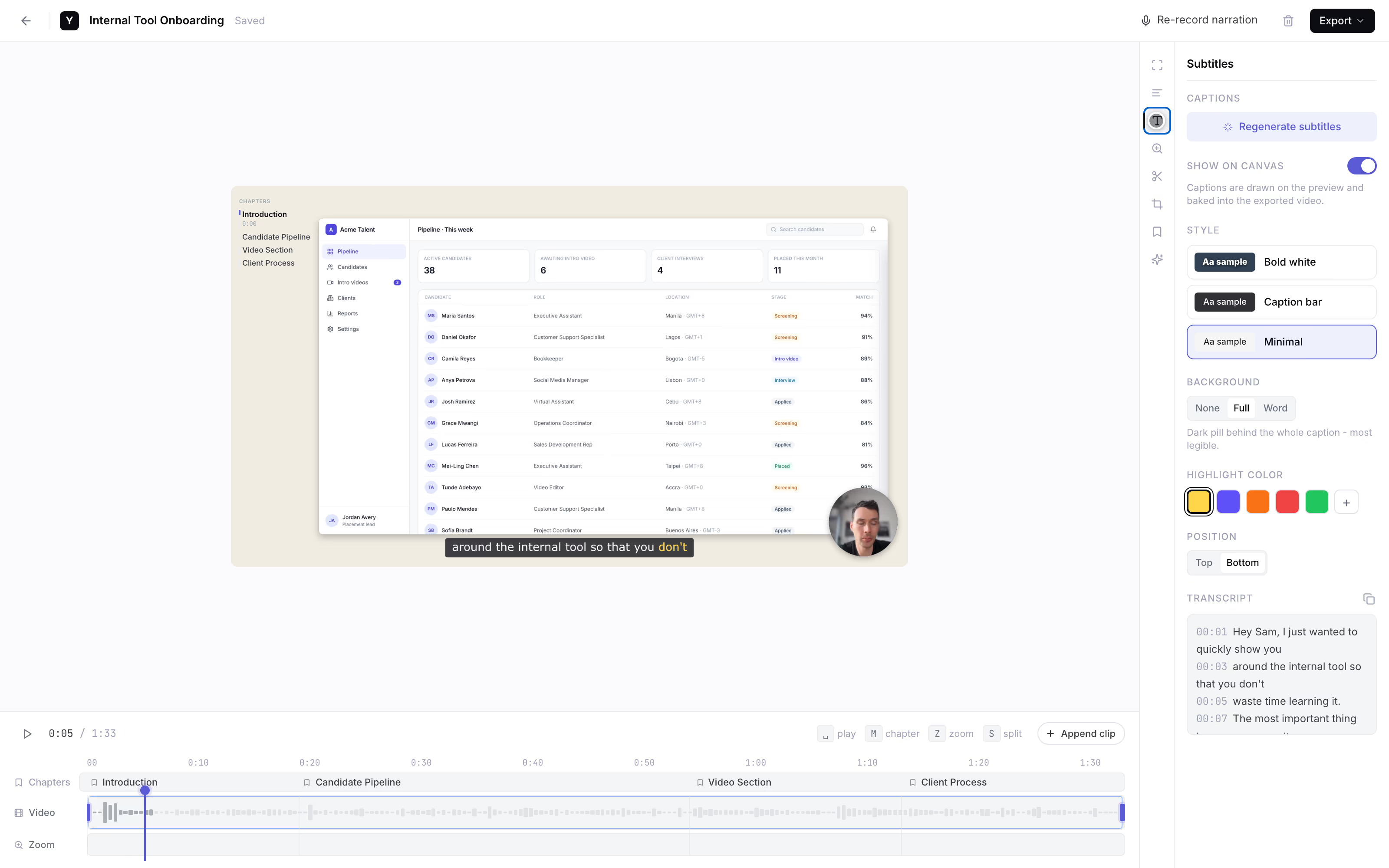
It lands back with you as a link with subtitles, so you read what they said while clicking through fields. Founder-run during the pilot.
AI subtitles
one link, and the discovery call becomes a video you can rewind.
Why in-browser matters
See the exact fields, not a description of them.
- It works when IT blocks every install. The ops person is often on a managed machine where install is impossible, not just annoying. A browser link runs in the tab that's already open.
- Screen plus voice beats a static export. Migration accuracy depends on seeing the real field configs and the automation. A screenshot dump misses the structure; a walkthrough shows it.
- Subtitles catch what they narrate. Read what the ops person said as they clicked, in seconds, instead of scrubbing audio. Subtitles are the only AI feature we ship.
- Rewind instead of re-booking a call. Missed how a field maps? Scrub back. You don't burn another billable hour on a follow-up discovery call.
The honest comparison
It depends who presses record.
A category-level look, as of mid-2026. We're the right call when the person recording is your client on a machine you don't control.
Link the client records in
YoRecord- Good for
- Legacy walkthroughs from a client's ops person who has none of your tooling.
- Where it breaks
- Desktop browsers only, and IT policy can still block screen capture on some machines.
Loom, as the fallback ask
- Good for
- Someone who already runs Loom and has an account.
- Where it breaks
- Needs the ops person to install it, sign up, and often the extension - blocked on a managed machine.
Scribe / Guideflow / Tango
- Good for
- You documenting a process you already know, with the capture running on your machine.
- Where it breaks
- Built for the consultant to author, not for a client to show you a messy setup you have never seen.
A kickoff Zoom or live screen-share
- Good for
- Talking it through together in real time.
- Where it breaks
- Synchronous, eats billable hours, and you can't rewind to check a field you missed.
Honest limits: we do not export or map data, and if a client's IT policy blocks screen capture on a managed machine, we can't get around it. Everything else is processed client-side, and nothing leaves the device until the client shares it.
Work with the founder
Founding pilotNo self-serve dashboard yet. For the first consultants, that's the feature.
Founding price. Cancel anytime.
- The founder personally sets up your discovery flow.
- Your prompt wording, shaped around the platform you migrate to.
- One prompt per module when a discovery spans several tools.
- Every client recording lands back with you - as a link with subtitles.
Reply to the email that brought you here.
We'll set up your discovery flow together.
No forms · No payment button · A real person replies
Separate from YoRecord Pro ($4/month), which upgrades the recorder for individuals. The pilot is a done-for-you discovery service - recording stays free for your clients either way.
Straight answers
The honest bits.
Can my client record on a locked-down company machine that blocks installs?
Yes - that is the whole reason this works. The client's ops person opens yorecord.com/recorder in Chrome, Edge, or Firefox on desktop, hits record, and walks through their legacy tool. No extension, no download, no admin rights. This is the difference that matters on a managed machine where IT blocks every install: they can't add a recorder app, but they can open a browser tab that is already there. Desktop browsers only: no Safari, no mobile.
Does the client need an account or any software?
No. The person you send the link to installs nothing and signs up for nothing. They open the link, allow screen and mic, record the walkthrough, and get a share link back. That is it. The recorder is free for your clients forever - free to record, add subtitles, and share back a link, with a 10-minute cap per recording.
Does it export or map data from the legacy system?
No, and it would be dishonest to pretend otherwise. We do not export data, we do not map fields, and we do not connect to the source or target platform. What you get is a video of the client's screen: their custom fields, their table structure, the automation nobody wants to touch. You watch it and do the migration. We capture the discovery walkthrough - the mapping and the move are still your work.
What if the client's IT policy blocks screen capture?
Then it will not work, and we will say so up front. Some enterprise machines block getDisplayMedia by policy, and no browser recorder can get around that - the block is enforced by the operating system, not by us. This is rare on the SMB clients most consultants migrate, but it happens. If a client's machine blocks screen capture, you fall back to a call. For everyone else, a no-install link is the one thing they can actually use.
How long can each walkthrough be - enough for a full module?
Up to 10 minutes per recording on the free tier. That fits one screen or one workflow per clip: their contact fields, one pipeline, one automation. For a multi-module discovery, the founder can set up several prompts during the pilot - one link per area - so the client records the CRM in one clip and the automations in another. Short, focused clips are also easier for you to rewind and check a field you missed.
What does the founder set up during the pilot, and what does it cost?
Founding price is $9/month for early consultants, and the list price will be $19. During the pilot it is founder-run: the founder personally sets up your discovery flow - the prompt wording, the link you send, and one prompt per module if you need it - and makes sure every recording lands back with you, not in a queue. The recorder stays free for your clients either way.
Prefer to try before you ask? Run a test clip in the recorder to see exactly what your client gets.
Scope it right
Next migration, see the setup first.
one link, and you can rewind.
Record a test clip yourself to see exactly what your client gets. When you want it set up for your practice, reply to the email that brought you here.