
For VA agencies & OBMs
Get the process on video.
Your client just opens a link.
Your client “doesn't have time” to write the process down and won't learn a documentation tool. Send one link instead: they record themselves doing the task once, and you get the video plus a transcript to build the SOP.
Want process-request links for your clients? Reply to the email that brought you here.
How it works
One link, one process, one transcript.
The setup lands on us, not on the client who's already too busy to document anything.
You send one link
Drop it into your onboarding message with a one-line ask. Nothing for your client to install. That's your whole part.
They record the walkthrough
Your client opens the link and hits record, right in the browser. They narrate while they click through the real task. Nothing to install, no account to make.
You get the SOP first draft
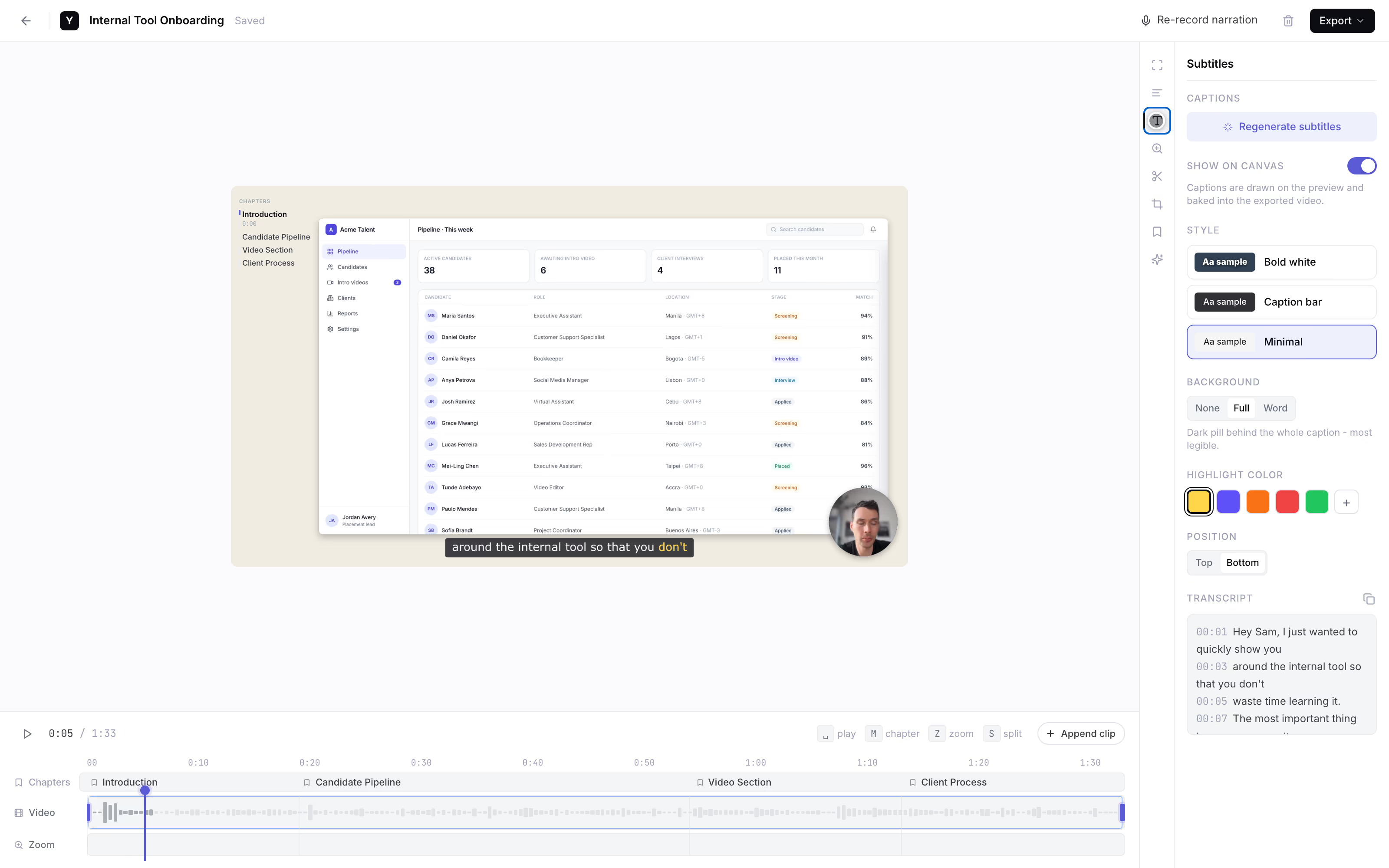
It lands back with you as a link with a transcript, so the words your client narrated become the first draft of the written SOP. Founder-run during the pilot.
client-process-walkthrough
AI subtitles · your SOP draft
Why the client records
The transcript is your SOP's first draft.
- The person who holds the knowledge records it. Your client won't learn a documentation tool for a one-off. A link is the lowest-friction thing you can ask them to click, so the raw walkthrough actually arrives.
- Screen plus webcam beats a talking-head. SOPs are exact clicks in specific tools. Your client narrating while they click is gold; a face-only video is worthless for handoff. YoRecord records both.
- The transcript writes the first draft for you. AI subtitles turn what your client said into a written draft, so you shape steps instead of typing from a blank page. Subtitles are the only AI feature we ship.
- The 10-minute free cap keeps it one process per clip. One task, start to finish, in a few focused minutes. Short clips are far easier to turn into clean SOPs than one sprawling recording.
The honest comparison
Raw capture vs. doc authoring.
A category-level look, as of mid-2026 - verify each vendor. We're the right call for getting the client to record; the others are for building your own team's docs.
Link your client records in
YoRecord- Good for
- The one person who holds the process - your client - actually records it, with no install and no account.
- Where it breaks
- You still author the SOP from the video. Desktop browsers only - no Safari, no mobile.
Scribe
- Good for
- Auto-builds a step-by-step doc with cropped screenshots - great for your own team.
- Where it breaks
- The documenter must install a browser extension, and the free tier is capped or watermarked. A non-starter for one-off client capture, as of mid-2026.
Tango
- Good for
- Same auto-generated step docs for people who run the extension.
- Where it breaks
- Extension-on-the-documenter model again, and the free tier is capped by workflow count. Your client will not install it, as of mid-2026.
“Have them record it in Loom”
- Good for
- The usual fallback ask when you need a raw walkthrough.
- Where it breaks
- Your client needs it installed and an account once the free cap runs out - the same install wall that stops the recording from ever arriving.
Privacy is built in: everything is processed client-side, and nothing leaves the device until your client shares it.
Work with the founder
Founding pilotNo self-serve dashboard yet. For the first agencies, that's the feature.
Founding-team price. Cancel anytime.
- The founder personally sets up your process-request flow.
- Your prompt wording, shaped around the task you need documented.
- Every client recording lands back with you - as a link with a transcript.
- Cancel anytime. The recorder stays free for every client you send a link to.
Reply to the email that brought you here.
We'll set up your process-request flow together.
No forms · No payment button · A real person replies
Separate from YoRecord Pro ($4/month), which upgrades the recorder for individuals. The pilot is a done-for-you SOP-capture service - recording stays free for your clients either way.
Straight answers
The honest bits.
Does my client need to install an extension or make an account?
No - that is the whole point. Your client opens the link in Chrome, Edge, or Firefox on a desktop or laptop, clicks record, and walks through the task while narrating. No extension, no account, no download, no admin rights. That is why the raw walkthrough actually shows up: the person who holds the knowledge will never install a tool for a one-off, so we ask them to click a link instead. Desktop browsers only - no Safari, no mobile.
Does it auto-generate a step-by-step SOP document?
No, and we will not pretend it does. YoRecord captures the raw walkthrough - the video of your client doing the task while they talk. It does not build a formatted step-by-step doc with cropped screenshots the way Scribe or Tango do. If you want a finished doc auto-built for your own team, use those. We win on the one thing they cannot: getting the client, who will never install an extension, to record the process in the first place. You author the SOP from the video.
Can I get a transcript to turn into a written SOP?
Yes. AI subtitles are the only AI feature we ship, and for this work they are the point: the auto-transcript is the first draft of your written SOP. Your client narrates while they click, the words get captured, and you turn that into steps instead of typing from a blank page. It is not a finished document - you still shape it into an SOP - but you are editing a draft rather than writing one from scratch.
How long can each process recording be?
Up to 10 minutes per recording on the free tier, and that cap maps neatly onto one process per clip. A single task - how I run payroll, how I close out an invoice - fits comfortably in a few minutes. Lean into the limit: ask your client to record one process at a time, start to finish. Short, focused clips are easier for you to turn into clean SOPs than one sprawling recording.
What does the founder set up during the pilot, and what does it cost?
During the founding pilot it is founder-run. The founder personally sets up your process-request flow - the prompt wording your client sees, the link you send, and the handoff so every recording lands back with you. Founding price is $9/month for early agencies and OBMs; the list price will be $19/month. The recorder itself stays free for your clients forever. AI subtitles are included.
Where do the recordings land - does it plug into my wiki or SOP tool?
There is no integration into your SOP or wiki tool - we would rather be honest than promise a connector that does not exist. What you get back is a plain share link, or an MP4. Paste it into Notion, Google Docs, ClickUp, Process Street, or wherever you build SOPs. During the pilot the founder makes 'lands back with you' work by hand through the share link, so nothing gets lost between your client and you.
Prefer to try before you ask? Run a test clip in the recorder, or see the wider case on our Loom alternative page.
Stop shadowing calls
Your next client onboarding, captured on video.
one link, one process, a transcript you can turn into an SOP.
Record a test clip yourself to see exactly what your client gets. When you want it set up for your agency, reply to the email that brought you here.