
For bookkeepers & fractional accountants
See your client's books.
They just open a link.
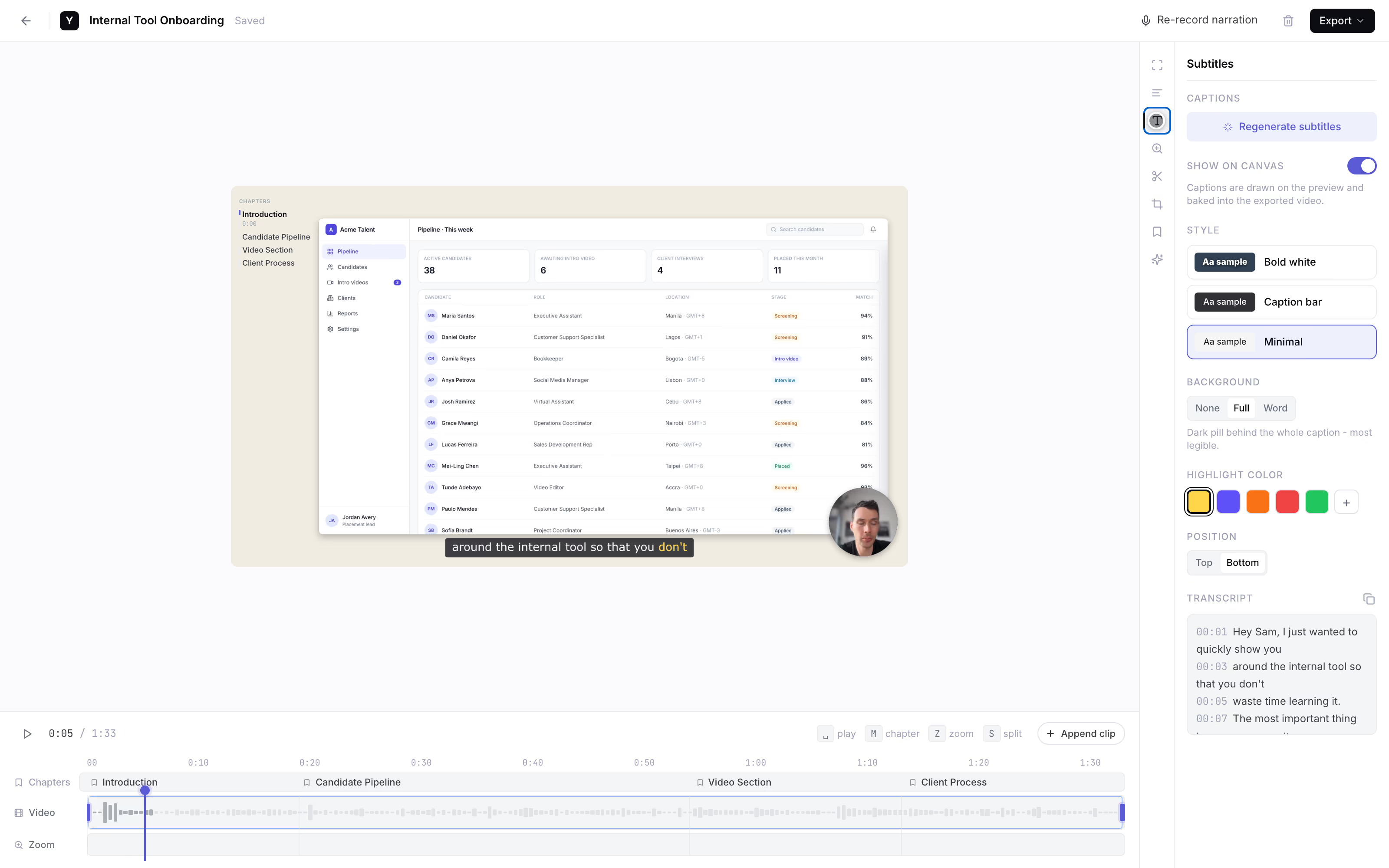
To take over a client's books you need to see how they actually work, but blurry phone photos and a Zoom they keep rescheduling drag onboarding out for weeks. Send one link instead: the client records their accounting screen and talks through it, and it comes back to you with subtitles.
Want it set up for your firm? Reply to the email that brought you here.
How it works
One link does the whole job.
The setup lands on us, not on the client you're onboarding.
Send one link
Drop it into your onboarding email with a one-line ask. That's your whole part.
They record their screen
The client opens the link and hits record, right in the browser. Nothing to install, no account to make.
You watch the walkthrough
It lands back with you as a link with subtitles, so you read what they said while clicking. Processed in their browser first. Founder-run during the pilot.
client-books-walkthrough
AI subtitles · auto
one link, no install, nothing uploaded until they share.
Why in-browser matters
See the screen, hear the client.
- Clients won't install another tool. For a one-off walkthrough, nobody downloads an extension or makes an account. A link is the lowest-friction thing you can ask a non-technical client to click.
- Nothing leaves their device until they share. Financial screens make people nervous. Everything is processed in the client's own browser; the video only leaves when they make a share link.
- Screen plus voice is the context. A talking head shows nothing. Their bank feed and folder tree, with 'this is where it won't let me categorize' over it, is exactly what you need.
- Subtitles catch the narration. Read what the client said in seconds instead of scrubbing audio. Subtitles are the only AI feature we ship.
The honest comparison
It depends who presses record.
A category-level look as of mid-2026; free tiers and limits move, so verify on each vendor's page. We're the right call when the client will only do it if there is nothing to install.
Link the client records in
YoRecord- Good for
- A client who will not install anything - they click the link and record on the locked-down laptop they already use.
- Where it breaks
- Desktop browsers only - no Safari, no mobile. Not remote control, so you cannot click for them.
Remote-access app (TeamViewer, Splashtop)
- Good for
- Full remote control when you need to drive the client's machine yourself.
- Where it breaks
- Needs a scary install with admin rights on the client's computer - overkill for a 90-second 'show me this screen.'
Loom
- Good for
- Fine for you, who already runs the extension and has an account.
- Where it breaks
- The free individual tier is capped, then it is extension plus signup - and non-technical clients bounce off that.
Live screen-share (Zoom, in-app)
- Good for
- Good for a real working session you both need to be in.
- Where it breaks
- Real-time only, so a one-minute question means scheduling a call across time zones the client keeps rescheduling.
Privacy is built in: everything is processed client-side, and nothing leaves the device until the client shares it.
Work with the founder
Founding pilotNo self-serve dashboard yet. For the first firms, that's the feature.
Founding-firm price. Cancel anytime.
- The founder personally sets up your video-request flow.
- Your prompt wording, shaped around how you onboard a new client.
- Every client recording lands back with you - as a link with subtitles.
- Cancel anytime. The recorder stays free for every client you send a link to.
Reply to the email that brought you here.
We'll set up your video-request flow together.
No forms · No payment button · A real person replies
Separate from YoRecord Pro ($4/month), which upgrades the recorder for individuals. The pilot is a done-for-you onboarding service - recording stays free for your clients either way.
Straight answers
The honest bits.
Does my client need to install anything or create an account?
No - that is the whole point. Your client opens the link in Chrome, Edge, or Firefox on their desktop or laptop, clicks record, and narrates their screen. No extension, no download, no account, no admin rights. They will not have to fight a Loom install or make a login, which is exactly where 'just record your screen' quietly dies and defaults back to a live call. Desktop browsers only: no Safari, no phones.
Is my client's financial data safe - where does the recording go?
The recording is processed client-side, inside your client's own browser. Nothing is uploaded while they record - the video sits on their device. It only leaves when your client chooses to make a share link and send it back to you. If they would rather not put a financial screen in the cloud at all, they can download the MP4 and send it however they prefer. Nothing about their books is touched until they decide to share.
Does it connect to QuickBooks or Xero?
No - and we would rather be honest than pretend. There is no QuickBooks or Xero integration and no receipt scanning (that is Dext or Hubdoc's job). What you get back is a plain video: your client's actual screen, their bank feed, their folder tree, with their voice explaining it. It replaces exactly the 'show me your screen' step, nothing more.
How long can a recording be and is that enough for a workflow walkthrough?
Up to 10 minutes per recording on the free tier - far more than you need. A full walkthrough of how a client enters an invoice runs two to four minutes, and a single 'here's the weird transaction' clip is under a minute. Treat it as one question per clip: short, specific, and easy for you to watch back between other work.
What does it cost, and what does the founder set up during the pilot?
The recorder is free for every client you send a link to - free to record, narrate, add subtitles, and send back, with a 10-minute cap per recording. The founder-run onboarding pilot, where we set up your video-request flow so every recording lands back with you, is $9/month for founding firms. The list price is $19/month. During the pilot the founder personally shapes your prompt wording and the link you send, and makes sure each client recording arrives.
Can my client do this on their locked-down work computer?
Yes. Because there is nothing to install and no account to create, it runs in the browser tab that is already open - even on an IT-locked machine that blocks the Chrome Web Store and admin-gated downloads. That is the single reason 'send me a recording' actually happens here instead of turning into another rescheduled Zoom.
Prefer to try it first? Run a test clip in the recorder to see exactly what your client gets.
Onboard faster
Your next client could record today.
one link, no install, nothing uploaded until they share.
Record a test clip yourself to see exactly what your client gets. When you want it set up for your firm, reply to the email that brought you here.